Documentation link: https://wpsimplepay.com/doc/customer-susbcription-management-settings/#allowing-management-for-subscriptions-created-without-wp-simple-pay
Subscriptions that were created without WP Simple Pay, or created manually in Stripe, will not receive Upcoming Invoice email reminders. These Subscriptions will not contain the necessary identifying information WP Simple Pay uses to determine the validity of a Subscription. In order to send emails for these Subscriptions, the Subscription must contain the following pieces of Metadata:
simpay_form_id
simpay_subscription_key

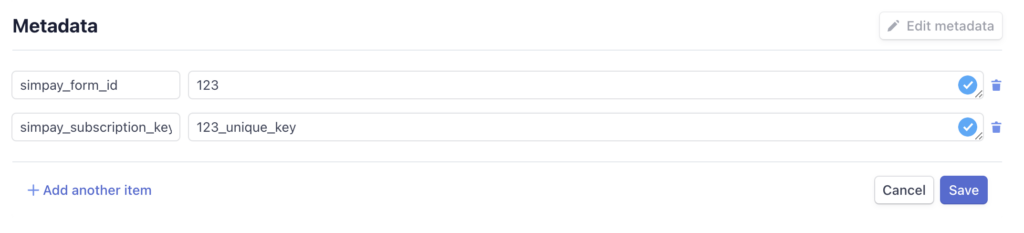
When viewing the Subscription in the Stripe dashboard, click “Edit metadata” in the “Metadata” section: Add the aforementioned pieces of metadata. simpay_form_id should match the ID of the payment form the Subscription originated from.
If the subscription was created without WP Simple Pay, you can use one of your existing subscription form IDs, or create a new subscription form to be used. Note: The payment form ID must exist within WP Simple Pay for the subscription management to work. simpay_subscription_key can be any arbitrary unique string.
simpay_subscription_key is used by WP Simple Pay to create a URL to the Payment Confirmation page containing the Update Payment Method form. Once you’ve added the information to the subscription metadata, as shown above, your customers will receive emails in the manner you have set them up to be sent.
Documentation link: https://wpsimplepay.com/doc/customer-susbcription-management-settings/#allowing-management-for-subscriptions-created-without-wp-simple-pay