Summary
WP Simple Pay relies heavily on JavaScript for many of its features. If a form is not working as expected, a JavaScript issue is one of the things to check for. Here are the steps to identify common JavaScript issues in WP Simple Pay and fix them.
Troubleshooting
Open up the payment form page’s source code. You can do this by right-clicking an empty spot on the page and selecting View Page Source.
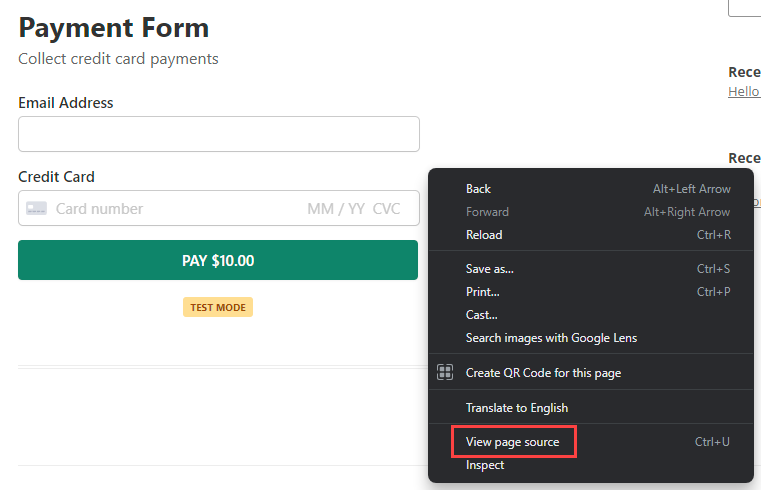
On the source code page, search for our JavaScript files using the keyword “simpay” (without quotes). For comparison, try running this same search on your local site (any page where a form is embedded).
If a simpay-*.js file cannot be found on the customer’s site even though a form is displayed, this tells us that WP Simple Pay assets are not loading properly.
Issue 1: Optimization plugin
When JavaScript files aren’t loading, but the form styles look just fine (meaning that our CSS files are loading), typically the culprit behind this issue is an optimization plugin. Optimization plugins will typically compress/minify JavaScript files, or even change where they load on a page.
How to Fix:
Please see this documentation for more details on resolving JavaScript issues related to optimization plugins. Has links to the more popular plugins.
Issue 2: Conflict with theme or other plugin
In other cases where there is no optimization plugin found on the site or if disabling the optimization settings does not resolve the issue, there is likely a conflict with another plugin or the site theme.
Additional details about theme conflict
If switching to a default WordPress theme resolves the issue, a common reason is that the wp_footer() function is not loaded on the template file (e.g., page.php).
Some themes have a separate footer.php file. In that case, the get_footer() function is used to load the footer.php file.
The wp_footer() function is usually located at the bottom of the template file or footer.php file.
Many plugins, including WP Simple Pay, rely on the wp_footer() function to load assets on the site page. If the function is absent, WPForms assets are not loaded at all.
The wp_footer() function could be missing because:
- The page template does not include the wp_footer() function, nor does it include the get_footer() function that loads the footer.php file.
- The page template includes a get_footer() function, but the footer.php file is missing the wp_footer() function.
To confirm these details on the duplicated site, you can use Appearance > Theme Editor in the admin area to check out the theme’s template files (e.g., page.php) and footer.php.